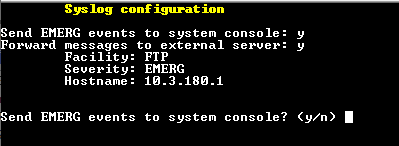
Server Syslog Configuration
This section describes how to send OVOC server Operating System (OS)-related syslog EMERG events to the system console and other OVOC server OS related messages to a designated external server.
|
➢
|
To send EMERG event to the syslog console and other events to an external server: |
|
1.
|
From the Diagnostics menu, choose Server Syslog, and then press Enter. |
|
2.
|
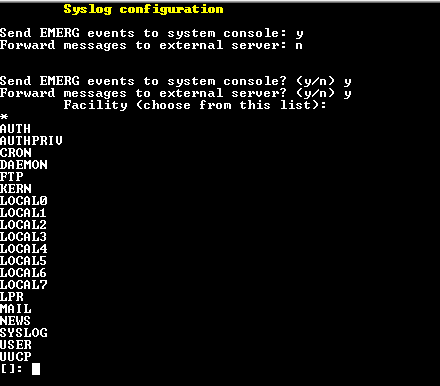
To send EMERG events to the system console, type y, press Enter, and then confirm by typing y again. |
Syslog Configuration
|
3.
|
You are prompted to forward messages to an external server, type y, and then press Enter. The OVOC server is rebooted. |
|
4.
|
Type one of the following Facilities from the list (case-sensitive) or select the wildcard * to select all facilities in the list, and then press Enter: |
|
●
|
auth and authpriv: for authentication; |
|
●
|
cron: Task scheduling services, cron and atd |
|
●
|
daemon: affects a daemon without any special classification (DNS, NTP, etc.) |
|
●
|
lpr: printing subsystem messages |
|
●
|
mail: e-mail subsystem messages |
|
●
|
news: Usenet subsystem message (especially from an NNTP — Network News Transfer Protocol — server that manages newsgroups); |
|
●
|
syslog: syslogd server messages |
|
●
|
user: user messages (generic) |
|
●
|
uucp: messages from the UUCP server (Unix to Unix Copy Program, an old protocol notably used to distribute e-mail messages); |
|
●
|
local0 to local7: reserved for local use. |
|
5.
|
Each message is also associated with a Severity or priority level. Type one of the following severities (in decreasing order) and then press Enter: |
Syslog Severities
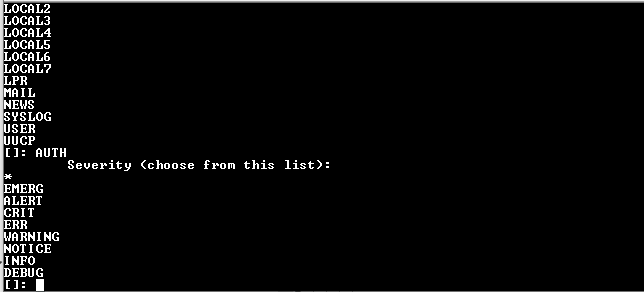
For the selected facilities, indicates one of the following:
|
●
|
emerg: Indicates an emergency situation, the system is most likely unusable. |
|
●
|
alert: Indicates that an action must be taken immediately. |
|
●
|
crit: Indicates that conditions are critical. |
|
●
|
err: Indicates an error. |
|
●
|
warn: Indicates a warning (potential error). |
|
●
|
notice: Indicates that conditions are normal, however, the message is important. |
|
●
|
info: An informative message. |
|
●
|
debug: A debugging message. |
|
6.
|
Type the external server Hostname or IP address of the Syslog server. |
Syslog Hostname
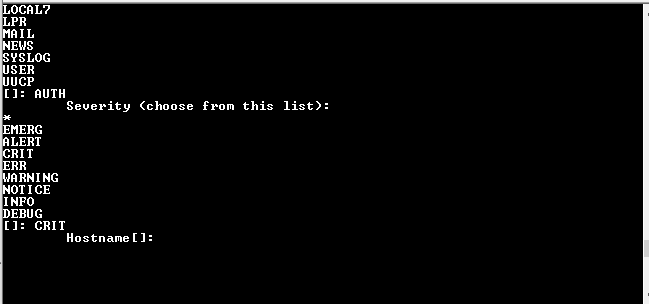
The example Message forwarding configuration is shown below.